Dashboard
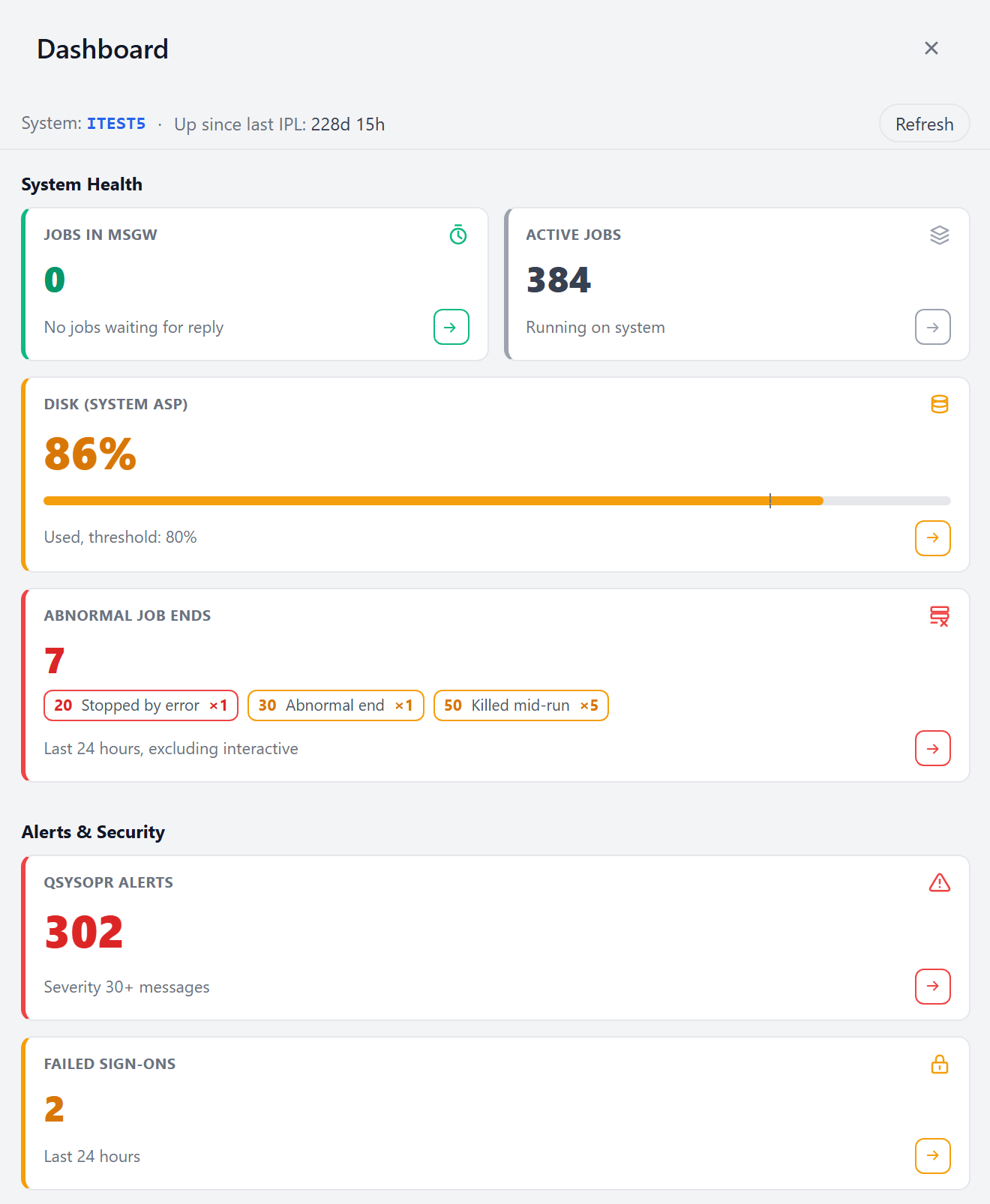
The Dashboard, the default landing page reached upon signing in, displays a set of system health indicators at a glance. Each tile tracks one indicator and reports it as a single number, taken live from your system.
Every tile also offers an Ask OpsIQ button, which initiates a new conversation in the Chat Assistant about that tile's indicator. When an indicator looks wrong, that button is the quickest way to find out why.
Reading a tile
All tiles share the same shape: the tile name, the number, and a line underneath saying what the number covers. A colored bar down the left edge indicates the priority or severity OpsIQ assigns to the current reading:
- gray: a plain count, carrying no priority;
- green: nothing to look at;
- amber: worth a look;
- red: look now.
OpsIQ sets that priority per indicator rather than on one shared scale, and some tiles never use all four colors. Each section below explains a tile's rule alongside what that tile tracks.
The Ask OpsIQ button at the bottom right of a tile, a small arrow, initiates a new conversation in the Chat Assistant seeded with a question about that tile's indicator. It opens in place of whatever conversation you were reading, which is kept and stays in your sessions. The seed question is an ordinary chat question. You can follow up with more direct questions based on the assistant's initial response.
A tile that cannot load shows the error the server reported (or Unavailable when there is no more detail), or Requires higher authority when your IBM i user profile lacks authority to the data behind it. Either way the other tiles carry on working. Every tile queries your system as you, so two people can see different numbers.
If OpsIQ loses its connection to IBM i altogether, a banner reading Lost connection to IBM i — retry? appears across the top of the screen. Select Retry to try again, or dismiss the banner; it clears by itself as soon as a request gets through.
The header

The strip above the tiles names the system you are connected to and how long it has been up since its last IPL. If OpsIQ cannot determine the last IPL, the uptime reads unknown.
The Dashboard automatically reloads every tile roughly every five minutes. Refresh reloads them all immediately and restarts that countdown. While tiles are reloading they keep showing their previous numbers, so the screen does not flicker between values.
System Health
Jobs in MSGW
How many jobs are sitting in MSGW (message wait) right now, each one stopped until somebody answers an inquiry message.
Green when nothing is waiting, amber as soon as anything is. This tile never turns red: a handful of jobs in MSGW is normal on a busy system, and treating it as an emergency would make the color meaningless.
Ask OpsIQ asks: Show me a list of jobs currently in MSGW.
Active Jobs
How many jobs are active on the system.
This tile is always gray. What counts as a normal job count depends on your workload, so OpsIQ reports the number and leaves the reading of it to you. It is most useful watched over a few days.
Ask OpsIQ asks: What jobs are currently active?
Disk (System ASP)
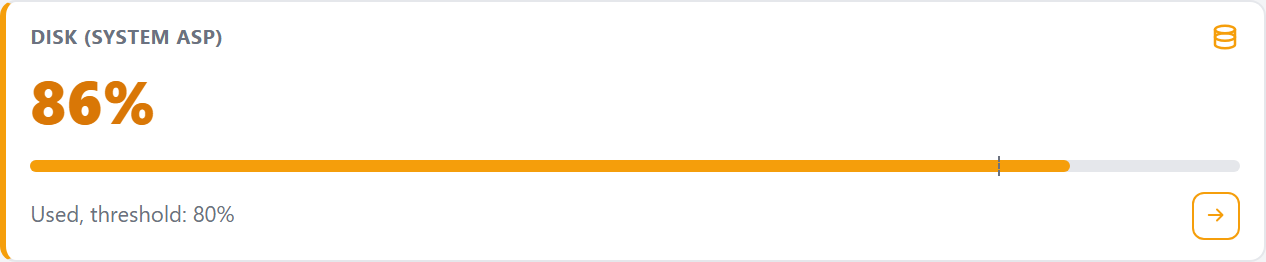
How full the system ASP (the storage IBM i reports as ASP 1) is, as a percentage. The bar underneath fills to that percentage, and the small vertical marker on it is your system's own storage threshold, the one set on the box in SST or with CHGASPA. The subtitle names it: Used, threshold: 80%.
Green below the threshold, amber as you come within two points of it, and red at 95% or above regardless of where your threshold sits. Raising or lowering the threshold on your system moves the marker and the amber band with it.
Only the system ASP is measured. If your system has basic user ASPs or independent ASPs, their storage is not included in this number.
Ask OpsIQ asks: What is using the most System ASP storage?
Abnormal Job Ends
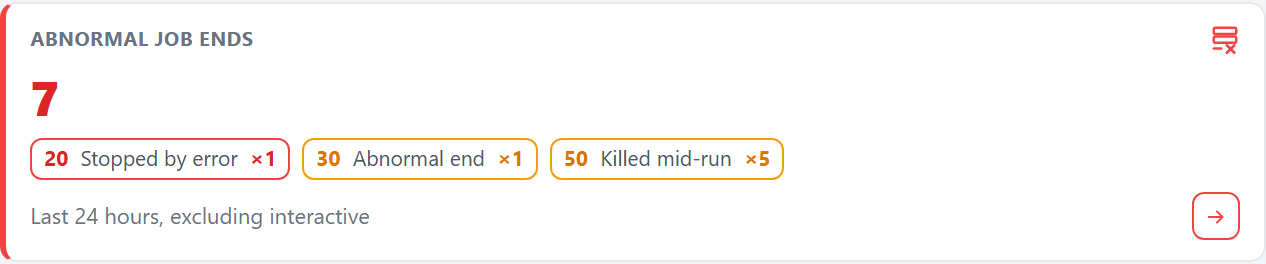
How many jobs ended abnormally in the last 24 hours, with a chip for each end code that occurred: the code, what it means in plain language, and how many times it happened. Hover a chip for a fuller explanation of that code.
Red if any of the codes present is a serious one (20, 60, 70 or 90), even if it happened only once, because one job stopped by an unhandled error is worth knowing about. Green when nothing ended abnormally, amber otherwise.
This count excludes interactive jobs
Interactive 5250 display-station jobs (QPADEV*) are left out, because a user closing a session ends a job abnormally and would bury everything else. A count you run yourself against the history log will therefore be higher than this one.
Ask OpsIQ asks: List the jobs that ended abnormally in the last 24 hours, excluding interactive display-station jobs.
Alerts & Security
QSYSOPR Alerts
How many messages of severity 30 or above are sitting on the QSYSOPR message queue.
Green at zero. Red if any message on the queue is severity 50 or above, amber otherwise, so the color follows the most serious message present rather than the size of the count.
Read this number as a queue depth
It counts every qualifying message currently on the queue, with no time window. Informational and completion messages are included, and answered inquiries too. A queue nobody clears will keep climbing, so a large number can mean housekeeping rather than trouble. It also counts only what your profile is allowed to see, so zero is not proof there is nothing wrong.
For the messages themselves, grouped by severity and with investigations attached, use System Messages.
Ask OpsIQ asks: Show me the QSYSOPR messages with severity 30 or higher
Failed Sign-ons
How many sign-on attempts failed in the last 24 hours.
Green at zero, amber at anything above it. This tile never turns red, because how many failures is too many depends on your environment, and OpsIQ will not guess.
What this counts
It counts three specific messages in the history log: CPF2234 (5250 sign-on), CPF22E2 (password validation) and CPIAD06 (host servers such as ODBC, JDBC and FTP). Failures that never reach the history log are not counted, and neither are profile-disabled messages. Treat the number as a prompt to look, and use your security audit journal when you need a complete record.
Ask OpsIQ asks: Show me the failed sign-on attempts from the last 24 hours.